Showing posts with label Gear. Show all posts

Tuesday, February 19, 2013

Microsoft Surface Pro for the Photographer

p1436714046-4[1]

It’s been a long, long wait, but it’s finally here.  The Microsoft Surface Pro is on the market and I’m lucky enough to have spent the last week setting mine up and using it for my photography tasks.  That’s right.  A tablet form factor running Lightroom and Photoshop!

For 7 months I got to read editorials saying things like: “It’s too heavy. It’s too expensive.  There’s not enough available storage.  The battery life is horrible. The wide screen is awkward. The kickstand isn’t adjustable. Who uses a pen anymore?” Blah, blah, blah, blah!

Now that I finally have it in my hands, here’s my response: “WHO CARES!”.  Yes it’s a tablet and if that were all it was the naysayers may have valid points.  What they were all overlooking, however, is that this is also a fully functional Intel powered laptop!  I’m running Adobe Lightroom 4, Adobe Photoshop CS 6, Microsoft Office 2013, Windows Media Center, no compromise web browsers and on and on and on.  In short, I am PRODUCING content and not just consuming it all on a device slim enough and lite enough to slide into my messenger bag with my Nikon D300s and my work HP EliteBook laptop.

With all of that being said, here are a few of my personal observations for those of you who may be considering your own Surface Pro now that stock is beginning to be replenished.

  • Windows 8 –  I’ve been using the new OS on my work computer for a while, but on a touch-based device it really comes to life.  Forget about the Start menu and embrace the efficiencies of the new design.
  • Tablet Experience – The screen is incredible. A visual treat with a very responsive feel to your touch.  While there is definitely still “app discrimination” when compared to the iPad and Android markets, things are coming around and I’m confident that the Surface will help accelerate the pace. One area that did catch me off-guard was the fact that so many magazine publishers only allow Amazon to cater to iOS and Android.  For example, Outdoor Photographer is available via Zinio, but you won’t find it on Amazon.
  • Desktop Experience – Having used Windows 8 for awhile now, the only challenges to using the full desktop environment on the Surface have been 1) Getting accustom to the Type Cover and, 2) text scaling.  I have purposely limited myself to he Type Cover so that I’d become more efficient. I’ll be honest, I won’t win any typing contests, but it’s still better than being limited to an on-screen version (new wireless keyboard and mouse arrive for my desk today).  The text scaling comes into play when connected to an external display.  Out of the box, the Surface Pro is set to scale your text to 150%.  That’s a good size when you’re packing 1920x1080 pixels into a 10” space, but not so great on a 24” external display.  It’s a shame text scaling isn’t display independent, but I’ve found what works best for me is to default back to 100% as most of my desktop experience happens on the external display.  On the occasions where I only have the 10” display, a few keystrokes (namely Ctrl + ‘+’) allow me to zoom in at the application level.
  • WiFi Only – I tend to be where the WiFi is so the lack of a cellular radio doesn’t impact me all that much.  If I must, must, connect, there’s always the option to tether to my phone.
  • Storage – I’ve done a few proactive tasks here to help make my 128GB go as far as possible:
    • New Lightroom Catalog – I’ve backed up my old (and somewhat bloated) Lightroom catalog to my external drive and started over.  Well, I imported my keyword hierarchy, a few other preferences and of course my “best of the best” photos, but otherwise it was time for a clean start.
    • “My Documents” on “D:” – I popped in my 64GB microSXDC card, formatted it with NTFS and changed the default location for the “Documents” library to point to this new drive.  From what I’ve read, you cannot install applications on external devices so reserving space on the C: drive for apps is something to consider up front.
    • Available Space – I’m still at 66GB free with Lightroom, Photoshop CS 6, Photomatix, Topaz Adjust, Word, Excel, OneNote, Chrome, Kindle, Live Writer, Movie Maker, Media Center, Total Theater, etc……  I am not loading my music library as I already have it on my phone and any movies (which look awesome on this display, btw) or other large files go to the external drive.  This leaves me with ample room for the photos I’ve yet to take and process.
    • Backups – I have a few OneNote docs on my SkyDrive for convenience, but limited to satellite internet at home prevents me from overusing cloud-based services.  I do, however, backup EVERYTHING to my Windows Home Server each night.

Oh, and that pen thing…. It ROCKS! While I’ve used it occasionally in OneNote, its value to me is inside Lightroom and Photoshop.  Yeah, editing photos on a 10” display isn’t something you’ll want to do everyday, but when you have detail work to do with that pen, it blows away my old Wacom tablet.

For now, that’s all.  Is the Surface Pro the holy grail of all computing devices? Probably not.  If you asked me what I’d change, however, I’m not sure I’d have much in the way of answers.  It’s the form factor I’ve been waiting for to provide the ultimate in portability which, in itself, asks for compromises.  The selling point for me was the fact that I can be productive wherever and whenever and in that space, I have not been disappointed in the least.

Update: This morning I had the opportunity to test drive the Type Cover.  As I was never a very good touch typist and with productivity being my aim, I’ve made the switch.  For a few bucks more and a couple of extra millimeters in thickness, I can now proclaim that I’ve relinquished the “Backspace” key as my favorite key.

Friday, November 9, 2012

Wildlife Photography Resource

If you’re like me you’re constantly on the lookout for ways to improve your photography and in this day and age there are a lot of sources for knowledge. Blogs, social sites, books, magazines… you don’t have to look far to find someone willing to offer you advice.

I recently purchased and read Jim Harmer’s “Improve Your Wildlife Photography” kindle edition book.  Like most photography books you will find that there is some rehashing of things you already know, but there were some nice tips included for my $3.99 investment. 

It’s not a long book (only 40ish pages), but that’s the beauty of e-publishing.  It doesn’t have to be crammed full of 200 pages of fluff to make the buyer feel like it was worth their money.

Have you read any good photography books or stumbled upon any worth while blogs lately?  Drop a comment below and share your most valuable resources.

Friday, October 19, 2012

Still Waiting…

Earlier this week, Microsoft FINALLY released pricing and pre-order options for the Windows RT version of their new Surface tablet.  First announced back in June, there has been a lot of chatter and speculation in the industry around capability and pricing.  All of that is now known for the RT version which is set to ship on 10/26 – the same day Windows 8 is released.

So why am I holding out for the Pro? Because it will finally offer the promise of what I think a device like this should be.  Apple’s original vision for the iPad was as a “content consumption” device and every tablet variation since has been adapted to that model.  My point is that if I’m going to spend as much or more than I would for a full-blown laptop to enjoy the form factor, it better do more than let me browse the web, read a book or play some scaled down game.  I want to run Lightroom and Photoshop and a full version of OneNote.  In short, I want to be productive.  I want to produce content, not just consume it.

“Process photos on a 10.6” screen?”.  OK, so that’s not the primary selling point, but when sitting at my desk I’ll still be connected to a big beautiful screen for photo processing.  But what about when I’m not at my desk?  Yeah, this is the part that I’m actually most excited about.  By day, I carry my camera and work laptop in a nice messenger bag.  There’s no room in there, however, for my personal laptop that I use for, well, personal stuff… photos, notes, books, etc.  Now there will be.  What about having a built in stylus capability within Lightroom and Photoshop?   USB 3.0, microSDXC memory card slot for additional expansion, a complete operating system (that’s right, I’ll have access to the file system), etc., etc., etc.. 

Bring it on, Microsoft. I’m ready.  What about you? Would you consider giving up your desktop/laptop and replacing it with a tablet form factor?

Tuesday, October 16, 2012

Know Thy Camera–Or Else…

So a few weeks back I was completing the Sunday evening ritual of wheeling the trash to the end of the driveway where it would “magically” disappear before I left for work the next morning.  It was then that I happened to notice a faint green glow in the northern sky which gradually intensified into one of the better displays of the aurora borealis that I’ve seen in some time.  I stood and watched for a few seconds before I went back to tell my wife and grab the camera/tripod.

As I was setting up, my wife commented on how it seemed to build up for about 45 seconds to a minute before it would fade back down to being barely noticeable.  By then I was setup, switched the camera to aperture priority, closed the aperture down to get a longer exposure and then clicked the remote release.  Exactly 30 seconds later I heard the click of the shutter and subsequently watched the sky turn a bright green and quickly fade back down.

Ahhh!  I need probably a 90 second or 2 minute exposure but my camera automatically cuts off at 30 seconds unless… unless I SET IT TO BULB MODE!  Right. So bulb mode? How do I do that again?  Menu option? Mode dial? Maybe if I just hold down the release on the remote and keep it depressed??? No, no and nope.

Eventually, after much trying to locate “Bulb Mode” in the dark of night, I conceded defeat and ran back to the house to look it up on my cheat sheet.  “Turn the exposure  mode to MANUAL and then select the shutter speed immediately after 30 seconds”. Right.

Out the door, down the driveway, mode… dial… press remote shutter release and lock….. Hey. Where’d they go?  As I sat and waited for one minute… then two minute…. then three, it became obvious that I missed my window.

The moral of the story? Not only do you need to read the manual, the book, the cheat sheet, but you also need to practice these things so that when the time comes you aren’t left fumbling as I was.

Did anyone else who remembered “bulb mode” get any decent shots of the Northern Lights?

Friday, August 31, 2012

YAKB: Yet Another Kelby Book

In my quest to keep the Kelby children fed, I recently purchased yet another Scott Kelby book titled “The Adobe Photoshop CS 6 Book for Digital Photographers”.  That’s right, I’m anxiously awaiting the delivery of my copy of Photoshop CS6 and to help pass the time I thought I’d order a book from one of my favorite photography authors.
I’ve barely scratched the surface and am currently reading about Camera RAW.  As an avid Lightroom user, I’m wondering if I’ll ever use it, but there’s still some helpful post processing tips to be found there as well.  In fact, now I’m wondering how long it will be before I bite the bullet and order Scott’s updated Lightroom book for version 4?

Can anyone out there recommend other good Photoshop CS6 books for “newbies”?

Friday, July 27, 2012

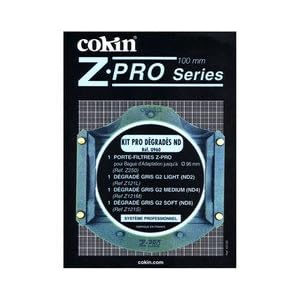
Cokin’s Z Pro Series Filter Holder

With incredible advancements in post processing software and techniques, most filters can be “faked” after the fact these days which helps reduce the amount of items you need to stuff into your gear bag.  There are a couple of filters that are still pretty nice to have, however.  Faking the effects of a polarizing filter is pretty much impossible and under certain conditions, neutral density filters are pretty handy to have in your bag too.

When I became interested in landscape photography, I purchased the Cokin Z-Pro Series Graduated Filter Kit.  It included a nice case, the filter holder and (3) 4”x6” graduated neutral density filters of varying degrees all wrapped in protective cloth sleeves.  What did not come in the kit was an adapter ring to mount the holder to the end of your landscape lens.

Most of the resources I read recommended to simply hold the filters in front of your lens so you had maximum control over where and how you placed the graduated lines in your shot.  So that’s what I did and simply left the holder in the bag.

Generally this “hold your own” technique works pretty well, but I managed to screw up more than a few shots at the same time.  Consider that you’re shooting longer exposures mounted from a tripod and then you manually hold a filter (or filters) up against the end of your lens.  Holding the filter too far away from the lens can result in photos with your fingers included, reflections from the filters themselves, the edge of the filter appearing in the frame, etc.  Hold the filter tight up to the lens and you can be introducing vibrations into the image that you’ve worked so hard to avoid with your tripod and remote.  So this last Christmas when I found the appropriately sized adapter ring in my stocking, I thought it was worth a try.

So here’s a scenario where the use of ND filters is pretty much a requirement – shooting into the sun.  The image is also a good reminder to prepare your gear the night BEFORE a sunrise shoot.  Notice 1) very dirty sensor (most of which was corrected with a few button presses by the in-camera sensor cleaner), and 2) smudges on the filters themselves which wiped right off when I cleaned them later.  Both of these quick cleaning tasks are things I should have done the night before. Sad smile

The large red arrows, however, point out a new problem introduced with the filter holder – vignetting. Sometimes it’s a cool effect to add to your photos in post, but not as cool when it’s embedded into your image and can be difficult to eliminate.  I should also point out that I’m shooting at 18mm which is wide, but certainly not as wide as most dedicated landscape lenses.  If you were shooting a little tighter, you’d probably be alright.  Needless to say, I removed the holder after only a couple of shots and went back to more handheld shots – some of which included my finger and the edge of the filter!

Another recommendation I’ve read but not yet tried is the use of gaffer’s tape.  Just tear off a piece, stick one end to the edge of your filter and the other right to your camera lens to hold it in place.  Assuming one can keep the tape out of the frame and the tape holds up so your filters don’t end up swimming in Lake Michigan, this could be my next experiment.

Do you have any experience with landscape filters?  Any tips on how to get the most out of them without shooting your fingers in the process?

Friday, July 20, 2012

Cotton Carrier Revisited

Last fall my wife and I added the Cotton Carrier camera vest to our respective gear bags for use on the kayaks. Having logged a few more trips this summer and the resulting experience with the Cotton Carrier camera vest, I can now officially declare it a truly useful gadget - especially for kayak photography.

Almost exclusively I'm shooting with my Nikon D300S with the 70-300mm f4.5/5.6 attached when in the kayak. This combination is still short enough that I can store it inside the middle hatch cover of my Hobie Outback when warranted, but most of the time its in my hand when we're on the water. While the Outback is an awesome kayak for photography and allows for one handed operation most of the time, there are still those rare occasions when I need to pick up the paddle or simply give my hands a rest. That's where this vest pays its dividends. Rather than going through the hassle of drying the hatch door, opening the hatch, squeezing the camera in for what usually only amounts to a few minutes, I can now quickly and securely drop the camera into receiver on the vest chest plate in just a few seconds. When I'm ready again, a quick turn and lift puts the camera back in my hand and ready for action.

While I'm sure there are other scenarios in which one would benefit from the Cotton Carrier, kayaking is still my one and only use. When I'm on land it's back to the Black Rapid strap for me.

Friday, July 13, 2012

The “Apple” Press

A couple of weeks ago I blogged about the announcement of Microsoft’s tablet entry, the “Surface”. Since then I’ve been watching the web for additional news about what I think will be a game changing product (not only about consuming content any more, but also being able to produce it) only to read article after article about how it’s not an iPad and therefore it will fail. Disappointed smile

As I stated in my original post, I’m not an Apple hater.  What I don’t understand, however, is how there can be such an overwhelming number of technical writers whose goal seems to be appeasing an Apple cult following rather than entertain the possibilities of a device that won’t even be released until this fall!

Friday, June 22, 2012

The Tablet Holy Grail?

I’m a PC.  That doesn’t mean I’m an Apple hater nor am I a Microsoft fanatic.  Simply put, it’s the platform that allows me to make a living  and it’s where I’m comfortable.

I’ve been intrigued by the tablet space for a long time and have been biding my time.  Long ago in my career I worked on a Toshiba tablet PC; a full blown laptop with a tiny 9” swivel touch screen.  It didn’t last long.  While the form factor and portability were great, the touch experience back then coupled with the meager screen real estate had me trading up shortly after the novelty wore off.

Fast forward several years and the reasons for this sexy form factor have changed very little for me.  Like every other tablet toting technophile, I’m a big consumer of digital content and tablets fit that niche perfectly.  My wife has an iPad and we have another “community use” lower end Android tablet to help manage daily life in the Schram household.  Both work well for browsing the web and reading digital books.  So why then am I so excited about the announcement of the Microsoft Surface?

In a word – productivity.  I’ve personally really struggled with what I call the “price-to-productivity” ratio.  If I’m going to spend as much or more money as I paid for my high-end entertainment laptop, then I expect more than just a sexy form factor that can surf the web or run countless time-wasting games or limited function apps.  If I’m going to spend enough to buy a high end laptop, then the device ought to have the functionality to replace the need for a high end laptop.  At first glance, the Microsoft Surface running Windows 8 Pro looks like a contender.  It will be interesting to watch things develop.

Do you own a tablet?  How has it changed the way you work and play?

Friday, June 1, 2012

Moose Peterson’s “Captured”– Adapting to Digital Content

I recently started reading Moose Peterson’s book, “Captured” and am really enjoying it.  Moose invites you into the interesting back story as to how he got his start as one of the leading wildlife photographers, shares some very useful advice on gear and photography technique and, of course, shares some of his favorite photos from his incredible career.  Definitely worth picking yourself up a copy.

This is the 3rd book I’ve committed to reading in an electronic format.  For me the jury is still out primarily because of the device I’m using (an older Android tablet with not so great resolution).  While I am in love with the idea of portability (Carry your whole library in your pocket? Who wouldn’t love the idea?), there are still those times when I’m just not sure.  I’m holding out for the release of the Windows 8 tablets later this fall (I’ve gotten my fair share of the iPad through my wife’s adventures) and hope that a better screen and form factor help bridge the gap.

How about you? Do you have both feet in the digital content camp or are you still looking for bookshelf space for your hardcovers and paperbacks?

Friday, April 27, 2012

Almost. It's Not ALWAYS About the Camera Gear

why its not always about the camera gear but how well you've prepared for the opportunity.
"Almost"

The above photo was included in Tuesday's final post in the "Eagle River Redux" series and I wanted to talk a little more about the emotion behind the image.

I've titled the image "Almost" in my catalog.  As in, I "almost" got the whole bird in the frame.  The photo was "almost" in focus.  The eagle "almost" caught a fish.  I "almost" had a photo worthy of hanging on the wall.  As a life event, it was a very exciting, memorable experience.  As a photography event, it was incredibly frustrating.  Frustrating because it was an opportunity that went unrealized.  

Photography is my form of "collecting".  A wall worthy shot of an eagle or osprey snagging a fish is something I'd really like to add to that collection.  Turning that wish into reality is all about making the opportunity happen and then executing when it presents itself.  Now the ideal opportunity would be to be sitting on the shores of the eagle's winter fishing grounds in Homer, Alaska with 300 or so of these magnificent creatures to photograph using the best equipment money could buy.  Right.  Well, that may be a while.

While this situation may not have been the ideal, its was a pretty good opportunity none the less.  I have an excellent camera in my Nikon D300s, I was lucky enough to be able to borrow my wife's Sigma 150-500mm lens, I'm sitting along the beautiful, peaceful Wisconsin River with not 300 eagles, but 2 - all of the pieces I needed to make it happen.  So what went wrong? In a word - me.  I wasn't well enough prepared when the time came to put it all together. 

"Well, maybe if you had the new $3K Nikon Dxxx or a $10K Nikon 600mm f/4?".  How many of you know THAT photographer?  The photography forums are FULL of them.  These are the people who pre-order the instant the "new model" is announced and can recite the spec sheet verbatim.  They'll cut you down because you're shooting with an "old" camera and tell you how great they are because of what's in their gear bag.  And then you look at their photos.  You think to yourself, "They could have just as easily taken those shots with the camera in their cell phone.", and then you feel sorry for all that gear going to waste.

Instead of blaming the gear, the lighting or the eagle for moving too fast, I'm going to go on record as saying I wasn't prepared enough when the opportunity presented itself.  I don't need a new camera (although a faster, longer lens would be nice ;-), but instead I need to continue to get myself in front of more opportunities.  I need to continue to study and understand those thousands of camera options and the conditions in which I will benefit from using them.  I need to focus on my technique and most of all I need to keep putting the camera to my eye and pressing the shutter release.

Maybe someday I'll find myself at the winter feeding grounds in Homer, Alaska with hundreds of eagle shots to choose from.  Or maybe, and more likely, someday I'll find myself looking through the viewfinder at that single bird on the river.  Both scenarios provide the opportunity.  It's up to me to provide the preparation.

Think about it.

Tuesday, April 10, 2012

Eagle River Redux - Part I

If you've been a reader of the blog for awhile, you may remember a post from last March titled "The Eagle River Adventure".  Even then we knew we'd go back and we recently kept our promise with a return trip to Adventure Rental's "River Escape" vacation rental property.  The trip proved even more magical the second time around.

First, picture your dream getaway.  I know for many of you your thoughts may immediately turn to the island vacation for fun in the sun or the European trip to journey back through history.  While I certainly wouldn't turn down either opportunity, if I'm looking to relax, I mean really relax and recharge, put a camera in my hand and drop me someplace off the grid where it's just us and the wildlife.  Sitting on the end of the dock overlooking the Wisconsin River at River Escape was exactly what the doctor ordered.

This year we scheduled the trip a week later in the year in hopes that the ice would be off the river.  As it turned out, the unseasonal weather we'd experienced through most of March resulted in the ice being long gone.  We'd even considered taking our kayaks, but as luck would have it the "seasonal" weather returned just in time for our trip.  Less than a week before the temperature had been consistently flirting with the 80 degree mark.  On the first morning of our stay we awoke to a fresh layer of snow blanketing the ground.

Day 1

As mentioned in last year's post, one of the many reasons this is a great location to have a camera in hand is the fact that there is a bald eagle nest high in a pine right across the river.  If you can hold still long enough you're nearly guaranteed a view of these magnificent raptors.

Shooting with the Nikon D300s and a Nikon 70-300mm f/4.5-5.6 gave me some additional reach to interact with our wildlife buddies, but the lighting was horrible all day.  I had my camera set to 1/1000th of a second and auto-ISO topping out at 3200 whenever I took my seat on the dock.  Pretty much all of the photos I took that day ended up being at 3200 ISO.  As they say, a grainy photo is better than a blurry one or no photo at all.

Two mallard ducks express their opinions on property rights.
Day 2

While it had warmed up enough to dispense with the snow, the thermometer was still struggling to break the 40 degree mark.  The temperature being what it was, my wife was resigned to do her relaxing indoors and offered me the use of her Sigma 150-500mm f/5-6.3 lens for the first time ever (and I say thank you)!  The challenge for the day was not only to hold up 5 pounds of lens (someone needs a monopod), but to find the subject in the viewfinder to focus on.  The longer reach also came at the price of a slower shutter speed, but at least it was a tad brighter than the day before.

Mr. and Mrs. H. Merganser (nice doo Mrs :-)
In between waiting for one of the eagles to return to or depart from the nest, the mallards and hooded mergansers kept me entertained.  Then from the corner of my eye I saw two newcomers to the scene.  A pair of river otters!  Did I mention that I simply parked my butt on the dock bench and all of these photo opportunities came right to me?  Truly unbelievable.  At first I only saw one otter poking it's head up and looking around before slipping back beneath the surface all the while continuing to close the distance between us.  And then....

...wait for it ........

Perch anyone?

Up comes an otter with a face full of fish looking right at me seeming to say, "So are you getting this? Nice catch, huh?".  After he was sure I had realized the photo op, he turned has back and began working on his prize.  He was still going at it as he start up the river once again.

These two still weren't done with me, but we'll save that for another post. :-).

Before I wrap up for today, I wanted to provide just a little more feedback on the experience with the Sigma 150-500.  Of course I've seen many, many images that my wife has taken with this lens and heard a lot of feedback from her on its performance (or sometimes the lack thereof).  It probably also comes as no surprise that I secretly covet a nice long reaching, fast piece of glass, what photographer doesn't. Those day dreams usually surface after looking at some of the wildlife images of Moose Peterson or others with their $10K Nikon 600mm lenses (Nikon, if you're reading, I'm now accepting sponsors ;-).  Even the most "practical" option I've pondered, a Nikon 300mm f/2.8 with a teleconverter would put you back in excess of $6,500.  More than likely that one's going to be contained to "dream land" for quite some time. 

That being said, if your options are shooting with a considerably less expensive 500mm lens or not shooting with a 500mm lens, then I'd pick the first option.  It's probably not going to be the fastest lens in your bag at f/6.3, but with my camera focus mode set to continuous servo and my shutter-release set to "Release + Focus" priority, I was reasonably happy with the results.   Most definitely there were some shots where I wished the focus had caught up with me a little faster, but I'm also reasonably confident that additional practice at getting and keeping the lens pointed in the right direction would improve the percentage of keepers.  Overall, it was a real treat to shoot at 500mm even if the light was less than desirable.

Keep your eyes on the blog as I'll continue to share more images taken with this lens as well as the stories behind them.  If you've read enough to be intrigued by the possibilities of the River Escape property, give Cassandra at Adventure Rentals a call.  River Escape is just one of the options they have available to you and we HIGHLY recommend them.

Until next time, keep click'n.
-Ken

Friday, March 9, 2012

PhotoBert CheatSheets

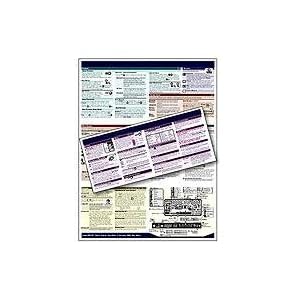
Without a question, today's DSLRs (and even point-and-shoots for that matter) are packed full of buttons, knobs, dials, software menus... lots of bells and whistles.  Whether its because you and your camera have become estranged or your memory just isn't what it used to be, it isn't very difficult to draw a blank when trying to remember how to change "setting x" to "value y".

PhotoBert to the rescue!  PhotoBert CheatSheets provide an easy alternative to lugging around your camera manual or absent mindedly searching through the menus trying to find that pesky setting while your photo op gets away. Summarized in an attractive 8.5 x11 inch laminated tri-fold format, PhotoBert's CheatSheets are organized into logical, color-coded sections that will help you track down "setting x" in no time. 

Whether you store it in your camera bag or put it in your back pocket when you're out in the field, a PhotoBert CheatSheet is helpful resource to have at your disposal. 

Friday, February 17, 2012

What's Your Next Gear Purchase?

Maybe it's just me, but there seems to have been a flurry of new gear being announced lately.  A few weeks ago, Nikon announced the D4 and last week the D800 made itself known to the marketplace.

I'm still learning the in's and out's of my D300s and honestly have no desire to move to a new camera body at this point.  It's the nature of the photographer to always be coveting that next new piece of gear, however, so I thought it would be interesting to ask the quesiton - "What will be your next photography gear purchase?". 

Share what's on your wishlist in the comments section below.

Friday, January 6, 2012

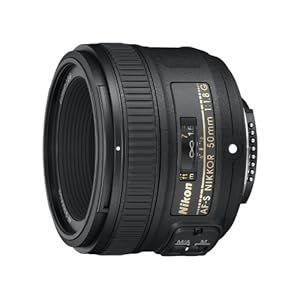
Nikon 50mm f/1.8 AF-S

Earlier in the week I blogged about the new Nikon 50mm f/1.8 that I found under the Christmas tree with my name on it.  Today, I thought I'd share a little more on my first experiences with a prime lens.

First and foremost, it's a f/1.8!  The primary driver for my wanting this lens was to be able to shoot those shallow depth-of-field portraits in low light conditions.  While it's not something I do a lot of, shooting the nieces and nephews indoors has always been challenging.  I'm hopeful this new option in the camera bag will help combat that particular scenario.  Oh yeah, did I mention the Bokeh? ;)

Second, it's a prime lens - my first.  "Sneaker Zoom"!I'm STILL turning the focus ring expecting the image to become magnified in the viewfinder before remembering I need to move my feet :).  With a minimum focus distance of about 18 inches, being able to shoot with both eyes open has proven yet again to be a useful skill.  Prevents me from plowing into my subject when the sneaker zoom gets a little carried away... 2 left feet and all.

50mm is a nice focal length for my purposes, and it's a pretty affordable tool to add to your own camera bag.  If you find yourself in the market, I'd highly recommend this lens.  You may also consider Nikon's 35mm f/1.8 specifically for DX cameras.

Monday, January 2, 2012

New Year. New Gear!

Question:  You're presented with a gift that turns out to be a Nikon 50mm f/1.8 lens.  What do you do?

Answer: You find yourself a couple of unwitting models to pose in front of the lights of the Christmas tree, open that baby all the way up and bask in all of that Bokeh goodness!

Thank you "Mrs. Claus" :)

What did YOU find under your tree?
Happy New Year!

Friday, November 25, 2011

Holiday Deals

The Christmas shopping season has arrived.  B&H has a whole section of holiday deals you just might want to check out.

Anyone found any photography related deals just too good to pass up?  What's on your photography wish list this year? 

Friday, November 11, 2011

Used Gear for Sale...

... not mine.  I'm still working on filling my camera bags.  LensProToGo evidently has some excess though and is selling off some of its used gear to the public to make room for new rental equipment.  If you have an interest, check out their remaining used inventory here.

Friday, October 7, 2011

Nik Software's Silver Efex Pro 2

Earlier in the week I mentioned how I downloaded a trial copy of Nik Software's Silver Efex Pro 2 in an attempt to "magically" salvage an image by converting to black and white.  While I ended up using a combination of Lightroom 3 and my trusty (but ancient) copy of Photoshop CS, it was more due to comfort and familiarity than lack of functionality in Silver Efex.  In fact, I've played with other trials in the Nik Software family and REALLY like the U Point technology for precise local adjustments.  I just may need to invest some time in these tools over the winter to determine if they have a home in our photography toolbox.
Do you use any of the Nik Software applications and if so, what's our impression?

Friday, September 23, 2011

Yellowstone Cliff's Notes

Our decision to detour through the Teton and Yellowstone National Parks on our return trip from visiting family out west was made on rather short notice.  While I'll include more detail on the trip in the coming weeks, I wanted to share a link to a rather helpful resource I picked up along the way.

The "Photographer's Guide to Yellowstone & the Tetons" by Joseph K. Lange proved to be a helpful resource.  Unfortunately our visits to this incredible location have always been as way points either to or from other destinations and time has been short to say the least.  Knowing we wouldn't have time to investigate on our own, I picked up this book in hopes of quickly hitting the "high points".  Even so, we STILL ran out of time. 

Whether you're just passing through or making the parks your primary destination, this book is a helpful resource to have in your library.